逍遥谷

记录日常的点点滴滴

0%

MD5 单向加密

1
2
3
4
5
6
7
8
9
10
11
12
13
14
15
16
17
18
19
20
21
/**
* 返回MD5单向加密后的十六进制字符串
* @param data
* @return
* @throws Exception
*/
public String getEncryptForHex(byte[] data) throws Exception {
byte[] digestData = encrypt(data);
StringBuffer hex = new StringBuffer();
for(int i = 0; i < digestData.length; i++)
{
int h = ((int)digestData[i]) & 0XFF;
if(h < 16)
{
hex.append("0");
}
hex.append(Integer.toHexString(h));
}

return hex.toString();
}

DES 对称加密

1
2
3
4
5
6
7
8
9
10
11
12
13
14
15
16
17
18
19
public byte[] encrypt(byte[] data) throws Exception {
if(secretKey == null || "".equals(secretKey)) {
throw new Exception("scretKey need to exists");
}
SecretKey md5Key = getKey(secretKey);
Cipher cipher = Cipher.getInstance(ALGORITHM);
cipher.init(Cipher.ENCRYPT_MODE, md5Key);
return cipher.doFinal(data);
}

public byte[] decrypt(byte[] data) throws Exception {
if(secretKey == null || "".equals(secretKey)) {
throw new Exception("scretKey need to exists");
}
SecretKey md5Key = getKey(secretKey);
Cipher cipher = Cipher.getInstance(ALGORITHM);
cipher.init(Cipher.DECRYPT_MODE, md5Key);
return cipher.doFinal(data);
}

RSA 非对称加密——私钥加密 & 私钥解密 & 私钥签名

1
2
3
4
5
6
7
8
9
10
11
12
13
14
15
16
17
18
19
20
21
22
23
24
25
26
27
public byte[] encrypt(byte[] data) throws Exception {
PrivateKey rsaPrivateKey = getRSAPrivateKey();
Cipher cipher = Cipher.getInstance(ALGORITHM);
cipher.init(Cipher.ENCRYPT_MODE, rsaPrivateKey);
return cipher.doFinal(data);
}

public byte[] decrypt(byte[] data) throws Exception {
PrivateKey rsaPrivateKey = getRSAPrivateKey();
Cipher cipher = Cipher.getInstance(ALGORITHM);
cipher.init(Cipher.DECRYPT_MODE, rsaPrivateKey);
return cipher.update(data);
}

/**
* 使用私钥 对数据进行签名
* @param data
* @return
* @throws Exception
*/
public String sign(byte[] data) throws Exception {
PrivateKey rsaPrivateKey = getRSAPrivateKey();
Signature signature = Signature.getInstance(SIGN_ALGORITHM);
signature.initSign(rsaPrivateKey);
signature.update(data);
return encoder(signature.sign());
}

RSA 非对称加密——公钥加密 & 公钥解密 & 公钥校验签名

1
2
3
4
5
6
7
8
9
10
11
12
13
14
15
16
17
18
19
20
21
22
23
24
25
26
27
28
29
30
31
32
33
34
35
36
37
public byte[] encrypt(byte[] data) throws Exception {
if(publicKey == null || "".equals(publicKey)) {
throw new Exception("publicKey is need exists");
}
PublicKey rsaPublicKey = getRSAPublicKey(publicKey);
Cipher cipher = Cipher.getInstance(ALGORITHM);
cipher.init(Cipher.ENCRYPT_MODE, rsaPublicKey);
return cipher.doFinal(data);
}

public byte[] decrypt(byte[] data) throws Exception {
if(publicKey == null || "".equals(publicKey)) {
throw new Exception("publicKey is need exists");
}
PublicKey rsaPublicKey = getRSAPublicKey(publicKey);
Cipher cipher = Cipher.getInstance(ALGORITHM);
cipher.init(Cipher.DECRYPT_MODE, rsaPublicKey);
return cipher.doFinal(data);
}

/**
* 使用公钥校验签名
* @param data
* @param sign
* @return
* @throws Exception
*/
public boolean verifySign(byte[] data, String sign) throws Exception {
if(publicKey == null || "".equals(publicKey)) {
throw new Exception("publicKey is need exists");
}
PublicKey rsaPublicKey = getRSAPublicKey(publicKey);
Signature signature = Signature.getInstance(SIGN_ALGORITHM);
signature.initVerify(rsaPublicKey);
signature.update(data);
return signature.verify(decoder(sign));
}
阅读全文 »

log4j支持同时按日期和文件大小分割日志

DailyAndSizeRollingFileAppender.java

1
2
3
4
5
6
7
8
9
10
11
12
13
14
15
16
17
18
19
20
21
22
23
24
25
26
27
28
29
30
31
32
33
34
35
36
37
38
39
40
41
42
43
44
45
46
47
48
49
50
51
52
53
54
55
56
57
58
59
60
61
62
63
64
65
66
67
68
69
70
71
72
73
74
75
76
77
78
79
80
81
82
83
84
85
86
87
88
89
90
91
92
93
94
95
96
97
98
99
100
101
102
103
104
105
106
107
108
109
110
111
112
113
114
115
116
117
118
119
120
121
122
123
124
125
126
127
128
129
130
131
132
133
134
135
136
137
138
139
140
141
142
143
144
145
146
147
148
149
150
151
152
153
154
155
156
157
158
159
160
161
162
163
164
165
166
167
168
169
170
171
172
173
174
175
176
177
178
179
180
181
182
183
184
185
186
187
188
189
190
191
192
193
194
195
196
197
198
199
200
201
202
203
204
205
206
207
208
209
210
211
212
213
214
215
216
217
218
219
220
221
222
223
224
225
226
227
228
229
230
231
232
233
234
235
236
237
238
239
240
241
242
243
244
245
246
247
248
249
250
251
252
253
254
255
256
257
258
259
260
261
262
263
264
265
266
267
268
269
270
271
272
273
274
275
276
277
278
279
280
281
282
283
284
285
286
287
288
289
290
291
292
293
294
295
296
297
298
299
300
301
302
303
304
305
306
307
308
309
310
311
312
313
314
315
316
317
318
319
320
321
322
323
324
325
326
327
328
329
330
331
package org.apache.log4j;

import org.apache.log4j.helpers.CountingQuietWriter;
import org.apache.log4j.helpers.LogLog;
import org.apache.log4j.helpers.OptionConverter;
import org.apache.log4j.spi.LoggingEvent;

import java.io.File;
import java.io.IOException;
import java.io.Writer;
import java.text.SimpleDateFormat;
import java.util.*;

/**
* <p></p>
* @author z```s
* @version 1.0.0
* @since java8
* 2020-10-30 17:18
*/
public class DailyAndSizeRollingFileAppender extends FileAppender {

static final int TOP_OF_TROUBLE = -1;
static final int TOP_OF_MINUTE = 0;
static final int TOP_OF_HOUR = 1;
static final int HALF_DAY = 2;
static final int TOP_OF_DAY = 3;
static final int TOP_OF_WEEK = 4;
static final int TOP_OF_MONTH = 5;

protected long maxFileSize = 10 * 1024 * 1024;

protected int maxBackupIndex = 1;

private String datePattern = "'.'yyyy-MM-dd";

private String scheduledFilename;

private long nextCheck = System.currentTimeMillis() - 1;

Date now = new Date();

SimpleDateFormat sdf;

RollingCalendar rc = new RollingCalendar();

int checkPeriod = TOP_OF_TROUBLE;

static final TimeZone GMT_TIME_ZONE = TimeZone.getTimeZone("GMT");

public DailyAndSizeRollingFileAppender() {
}

public DailyAndSizeRollingFileAppender(Layout layout, String filename, String datePattern) throws IOException {
super(layout, filename, true);
this.datePattern = datePattern;
activateOptions();
}

public long getMaximumFileSize() {
return maxFileSize;
}

public void setMaximumFileSize(long maxFileSize) {
this.maxFileSize = maxFileSize;
}

public void setMaxFileSize(String value) {
this.maxFileSize = OptionConverter.toFileSize(value, maxFileSize + 1);
}

public int getMaxBackupIndex() {
return maxBackupIndex;
}

public void setMaxBackupIndex(int maxBackupIndex) {
this.maxBackupIndex = maxBackupIndex;
}

public String getDatePattern() {
return datePattern;
}

public void setDatePattern(String datePattern) {
this.datePattern = datePattern;
}

@Override
public void activateOptions() {
super.activateOptions();
if (null != datePattern && fileName != null) {
now.setTime(System.currentTimeMillis());
sdf = new SimpleDateFormat(datePattern);
int type = computeCheckPeriod();
printPeriodicity(type);
rc.setType(type);
File file = new File(fileName);
scheduledFilename = fileName + sdf.format(new Date(file.lastModified()));
} else {
LogLog.error("Either File or DatePattern options are not set for appender [" + name + "].");
}
}

void printPeriodicity(int type) {
switch (type) {
case TOP_OF_MINUTE:
LogLog.debug("Appender [" + name + "] to be rolled every minute.");
break;
case TOP_OF_HOUR:
LogLog.debug("Appender [" + name + "] to be rolled on top of every hour.");
break;
case HALF_DAY:
LogLog.debug("Appender [" + name + "] to be rolled at midday and midnight.");
break;
case TOP_OF_DAY:
LogLog.debug("Appender [" + name + "] to be rolled at midnight.");
break;
case TOP_OF_WEEK:
LogLog.debug("Appender [" + name + "] to be rolled at start of week.");
break;
case TOP_OF_MONTH:
LogLog.debug("Appender [" + name + "] to be rolled at start of every month.");
break;
default:
LogLog.warn("Unknown periodicity for appender [" + name + "].");
}
}

int computeCheckPeriod() {
RollingCalendar rollingCalendar = new RollingCalendar(GMT_TIME_ZONE, Locale.getDefault());
Date epoch = new Date(0);
if (null != datePattern) {
for (int i = TOP_OF_MINUTE; i <= TOP_OF_MONTH; i++) {
SimpleDateFormat simpleDateFormat = new SimpleDateFormat(datePattern);
simpleDateFormat.setTimeZone(GMT_TIME_ZONE);
String r0 = simpleDateFormat.format(epoch);
rollingCalendar.setType(i);
Date next = new Date(rollingCalendar.getNextCheckMillis(epoch));
String r1 = simpleDateFormat.format(next);
if (null != r0 && null != r1 && !r0.equals(r1)) {
return i;
}
}
}
return TOP_OF_TROUBLE;
}

public void sizeRollOver() {
File target;
File file;
LogLog.debug("rolling over count=" + ((CountingQuietWriter) qw).getCount());
LogLog.debug("maxBackupIndex=" + maxBackupIndex);
String datedFilename = fileName + sdf.format(now);
if (maxBackupIndex > 0) {
file = new File(datedFilename + "." + maxBackupIndex);
if (file.exists()) {
file.delete();
}
for (int i = maxBackupIndex - 1; i >= 1; i--) {
file = new File(datedFilename + "." + i);
if (file.exists()) {
target = new File(datedFilename + "." + (i + 1));
LogLog.debug("Renaming file " + file + " to " + target);
file.renameTo(target);
}
}
target = new File(datedFilename + "." + 1);
this.closeFile();
file = new File(fileName);
LogLog.debug("Renaming file " + file + " to " + target);
file.renameTo(target);
} else if (maxBackupIndex < 0) {
for (int i = 0; i < Integer.MAX_VALUE; i++) {
target = new File(datedFilename + "." + i);
if (!target.exists()) {
this.closeFile();
file = new File(fileName);
file.renameTo(target);
LogLog.debug("Renaming file " + file + " to " + target);
break;
}
}
}
try {
this.setFile(fileName, false, bufferedIO, bufferSize);
} catch (IOException e) {
LogLog.error("setFile(" + fileName + ", false) call failed.", e);
}
scheduledFilename = datedFilename;
}

@Override
public synchronized void setFile(
String fileName,
boolean append,
boolean bufferedIO,
int bufferSize) throws IOException {
super.setFile(fileName, append, bufferedIO, bufferSize);
if (append) {
File f = new File(fileName);
((CountingQuietWriter) qw).setCount(f.length());
}
}

@Override
protected void setQWForFiles(Writer writer) {
this.qw = new CountingQuietWriter(writer, errorHandler);
}

@Override
protected void subAppend(LoggingEvent event) {
long n = System.currentTimeMillis();
if (n >= nextCheck) {
now.setTime(n);
nextCheck = rc.getNextCheckMillis(now);
timeRollOver();
} else if (null != fileName && ((CountingQuietWriter) qw).getCount() >= maxFileSize) {
sizeRollOver();
}
super.subAppend(event);
}

void timeRollOver() {
if (null == datePattern) {
errorHandler.error("Missing DatePattern option in rollOver().");
return;
}
String datedFilename = fileName + sdf.format(now);
if (scheduledFilename.equals(datedFilename)) {
return;
}
this.closeFile();
File target = new File(scheduledFilename);
if (target.exists()) {
target.delete();
}
File file = new File(fileName);
boolean result = file.renameTo(target);
if (result) {
LogLog.debug(fileName + " -> " + scheduledFilename);
} else {
LogLog.error("Failed to rename [" + fileName + "] to [" + scheduledFilename + "].");
}
try {
super.setFile(fileName, false, bufferedIO, bufferSize);
} catch (IOException e) {
errorHandler.error("setFile(" + fileName + ", false) call failed.");
}
scheduledFilename = datedFilename;
}

}

class RollingCalendar extends GregorianCalendar {

private static final long serialVersionUID = -3560331770601814177L;

int type = DailyAndSizeRollingFileAppender.TOP_OF_TROUBLE;

RollingCalendar() {
super();
}

RollingCalendar(TimeZone tz, Locale locale) {
super(tz, locale);
}

void setType(int type) {
this.type = type;
}

public long getNextCheckMillis(Date now) {
return getNextCheckDate(now).getTime();
}

public Date getNextCheckDate(Date now) {
this.setTime(now);

switch (type) {
case DailyAndSizeRollingFileAppender.TOP_OF_MINUTE:
this.set(Calendar.SECOND, 0);
this.set(Calendar.MILLISECOND, 0);
this.add(Calendar.MINUTE, 1);
break;
case DailyAndSizeRollingFileAppender.TOP_OF_HOUR:
this.set(Calendar.MINUTE, 0);
this.set(Calendar.SECOND, 0);
this.set(Calendar.MILLISECOND, 0);
this.add(Calendar.HOUR_OF_DAY, 1);
break;
case DailyAndSizeRollingFileAppender.HALF_DAY:
this.set(Calendar.MINUTE, 0);
this.set(Calendar.SECOND, 0);
this.set(Calendar.MILLISECOND, 0);
int hour = get(Calendar.HOUR_OF_DAY);
if (hour < 12) {
this.set(Calendar.HOUR_OF_DAY, 12);
} else {
this.set(Calendar.HOUR_OF_DAY, 0);
this.add(Calendar.DAY_OF_MONTH, 1);
}
break;
case DailyAndSizeRollingFileAppender.TOP_OF_DAY:
this.set(Calendar.HOUR_OF_DAY, 0);
this.set(Calendar.MINUTE, 0);
this.set(Calendar.SECOND, 0);
this.set(Calendar.MILLISECOND, 0);
this.add(Calendar.DATE, 1);
break;
case DailyAndSizeRollingFileAppender.TOP_OF_WEEK:
this.set(Calendar.DAY_OF_WEEK, getFirstDayOfWeek());
this.set(Calendar.HOUR_OF_DAY, 0);
this.set(Calendar.MINUTE, 0);
this.set(Calendar.SECOND, 0);
this.set(Calendar.MILLISECOND, 0);
this.add(Calendar.WEEK_OF_YEAR, 1);
break;
case DailyAndSizeRollingFileAppender.TOP_OF_MONTH:
this.set(Calendar.DATE, 1);
this.set(Calendar.HOUR_OF_DAY, 0);
this.set(Calendar.MINUTE, 0);
this.set(Calendar.SECOND, 0);
this.set(Calendar.MILLISECOND, 0);
this.add(Calendar.MONTH, 1);
break;
default:
throw new IllegalStateException("Unknown periodicity type.");
}
return getTime();
}
}

之后在配置文件中配置相关信息:

1
2
3
4
5
6
7
8
9
10
11
log4j.appender.R=test.Log4JDateAndSizeSplit
log4j.appender.R.Threshold=INFO
log4j.appender.R.ImmediateFlush=true
log4j.appender.R.File=/xxx.log
log4j.appender.R.DatePattern='_'yyyy-MM-dd'.log'
log4j.appender.R.Append=true
log4j.appender.R.MaxFileSize=200MB
#MaxBackupIndex=-1(not limit about file number)
log4j.appender.R.MaxBackupIndex=-1
log4j.appender.R.layout=org.apache.log4j.PatternLayout
log4j.appender.R.layout.ConversionPattern= %d{yyyy -MM-dd HH\:mm \:ss} [%5p] - %c -%F(%L) -%m%n
阅读全文 »

栈和局部变量操作

将常量压入栈的指令

aconst_null 将null对象引用压入栈
iconst_m1 将int类型常量-1压入栈
iconst_0 将int类型常量0压入栈
iconst_1 将int类型常量1压入栈
iconst_2 将int类型常量2压入栈
iconst_3 将int类型常量3压入栈
iconst_4 将int类型常量4压入栈
iconst_5 将int类型常量5压入栈
lconst_0 将long类型常量0压入栈
lconst_1 将long类型常量1压入栈
fconst_0 将float类型常量0压入栈
fconst_1 将float类型常量1压入栈
dconst_0 将double类型常量0压入栈
dconst_1 将double类型常量1压入栈
bipush 将一个8位带符号整数压入栈
sipush 将16位带符号整数压入栈
ldc 把常量池中的项压入栈
ldc_w 把常量池中的项压入栈(使用宽索引)
ldc2_w 把常量池中long类型或者double类型的项压入栈(使用宽索引)
从栈中的局部变量中装载值的指令
iload 从局部变量中装载int类型值
lload 从局部变量中装载long类型值
fload 从局部变量中装载float类型值
dload 从局部变量中装载double类型值
aload 从局部变量中装载引用类型值(refernce)
iload_0 从局部变量0中装载int类型值
iload_1 从局部变量1中装载int类型值
iload_2 从局部变量2中装载int类型值
iload_3 从局部变量3中装载int类型值
lload_0 从局部变量0中装载long类型值
lload_1 从局部变量1中装载long类型值
lload_2 从局部变量2中装载long类型值
lload_3 从局部变量3中装载long类型值
fload_0 从局部变量0中装载float类型值
fload_1 从局部变量1中装载float类型值
fload_2 从局部变量2中装载float类型值
fload_3 从局部变量3中装载float类型值
dload_0 从局部变量0中装载double类型值
dload_1 从局部变量1中装载double类型值
dload_2 从局部变量2中装载double类型值
dload_3 从局部变量3中装载double类型值
aload_0 从局部变量0中装载引用类型值
aload_1 从局部变量1中装载引用类型值
aload_2 从局部变量2中装载引用类型值
aload_3 从局部变量3中装载引用类型值
iaload 从数组中装载int类型值
laload 从数组中装载long类型值
faload 从数组中装载float类型值
daload 从数组中装载double类型值
aaload 从数组中装载引用类型值
baload 从数组中装载byte类型或boolean类型值
caload 从数组中装载char类型值
saload 从数组中装载short类型值

将栈中的值存入局部变量的指令

istore 将int类型值存入局部变量
lstore 将long类型值存入局部变量
fstore 将float类型值存入局部变量
dstore 将double类型值存入局部变量
astore 将将引用类型或returnAddress类型值存入局部变量
istore_0 将int类型值存入局部变量0
istore_1 将int类型值存入局部变量1
istore_2 将int类型值存入局部变量2
istore_3 将int类型值存入局部变量3
lstore_0 将long类型值存入局部变量0
lstore_1 将long类型值存入局部变量1
lstore_2 将long类型值存入局部变量2
lstore_3 将long类型值存入局部变量3
fstore_0 将float类型值存入局部变量0
fstore_1 将float类型值存入局部变量1
fstore_2 将float类型值存入局部变量2
fstore_3 将float类型值存入局部变量3
dstore_0 将double类型值存入局部变量0
dstore_1 将double类型值存入局部变量1
dstore_2 将double类型值存入局部变量2
dstore_3 将double类型值存入局部变量3
astore_0 将引用类型或returnAddress类型值存入局部变量0
astore_1 将引用类型或returnAddress类型值存入局部变量1
astore_2 将引用类型或returnAddress类型值存入局部变量2
astore_3 将引用类型或returnAddress类型值存入局部变量3
iastore 将int类型值存入数组中
lastore 将long类型值存入数组中
fastore 将float类型值存入数组中
dastore 将double类型值存入数组中
aastore 将引用类型值存入数组中
bastore 将byte类型或者boolean类型值存入数组中
castore 将char类型值存入数组中
sastore 将short类型值存入数组中

wide指令

wide 使用附加字节扩展局部变量索引

通用(无类型)栈操作

nop 不做任何操作
pop 弹出栈顶端一个字长的内容
pop2 弹出栈顶端两个字长的内容
dup 复制栈顶部一个字长内容
dup_x1 复制栈顶部一个字长的内容,然后将复制内容及原来弹出的两个字长的内容压入栈
dup_x2 复制栈顶部一个字长的内容,然后将复制内容及原来弹出的三个字长的内容压入栈
dup2 复制栈顶部两个字长内容
dup2_x1 复制栈顶部两个字长的内容,然后将复制内容及原来弹出的三个字长的内容压入栈
dup2_x2 复制栈顶部两个字长的内容,然后将复制内容及原来弹出的四个字长的内容压入栈
swap 交换栈顶部两个字长内容

类型转换

阅读全文 »

Redisson

Redis 官方给出了以上两种基于 Redis 实现分布式锁的方法,详细说明可以查看:https://redis.io/topics/distlock

Github: https://github.com/redisson/redisson

自己Java实现

1
2
3
4
5
6
7
8
9
10
11
12
13
14
15
16
17
18
19
20
21
22
23
24
25
26
27
28
29
30
31
32
33
34
35
36
37
38
39
40
41
42
43
44
45
46
47
48
49
50
51
52
53
54
55
56
57
58
59
60
61
62
63
64
65
66
67
68
69
70
71
72
73
package xxx;

import redis.clients.jedis.Jedis;
import redis.clients.jedis.params.SetParams;

import java.util.Collections;

/**
* <p>Used jedis 3.1.0</p>
* @see Jedis
*/
public class RedisDistributedLock {

private static final String LOCK_SUCCESS = "OK";
private static final Long UNLOCK_SUCCESS = 1L;
private static final long DEFAULT_MAX_LOCK_TIME = 300000L;
public static final String DELETE_SCRIPT = "if redis.call('get', KEYS[1]) == ARGV[1] then return redis.call('del', KEYS[1]) else return 0 end";

private Jedis jedis;

private String key;

private long lockTime;

private RedisDistributedLock(Jedis jedis, String key, long lockTime) {
this.jedis = jedis;
this.key = key;
this.lockTime = lockTime;
}

public static RedisDistributedLock build(Jedis jedis, String key) {
return build(jedis, key, DEFAULT_MAX_LOCK_TIME);
}

public static RedisDistributedLock build(Jedis jedis, String key, long lockTime) {
return new RedisDistributedLockV1(jedis, key, lockTime);
}

public boolean lock() {
return lock(0, 0L);
}

public boolean lock(int retryTimes, long retryIntervalTimeMillis) {
int times = retryTimes + 1;
for (int i = 0; i < times; i++) {
SetParams setParams = SetParams.setParams();
setParams.nx().ex((int) (lockTime / 1000L));
String result = jedis.set(key, String.valueOf(key.hashCode()), setParams);
if (LOCK_SUCCESS.equals(result)) {
return true;
}
if (retryIntervalTimeMillis > 0) {
try {
Thread.sleep(retryIntervalTimeMillis);
} catch (InterruptedException e) {
System.out.println(e.getMessage());
break;
}
}
if (Thread.currentThread().isInterrupted()) {
break;
}
}
return false;
}

public boolean unlock() {
Object result = jedis.eval(DELETE_SCRIPT, Collections.singletonList(key), Collections.singletonList(String.valueOf(key.hashCode())));
return UNLOCK_SUCCESS.equals(result);
}

}

阅读全文 »

不多说了直接看代码吧

1
2
3
4
5
6
7
8
9
10
11
12
13
14
15
16
17
18
19
20
21
22
23
24
25
26
27
28
29
30
31
32
33
34
35
36
37
38
39
40
41
42
43
44
45
46
47
48
49
50
51
52
53
54
55
56
57
58
59
60
61
62
63
64
65
66
67
68
69
70
71
72
73
74
75
76
77
78
79
80
81
82
83
84
85
86
87
88
89
90
91
92
93
94
95
96
97
98
99
100
101
102
103
104
105
106
107
108
109
110
111
112
113
114
115
116
117
118
119
120
121
122
123
124
125
126
127
128
129
130
131
132
package xxx;

import org.apache.zookeeper.*;
import org.apache.zookeeper.data.Stat;

import java.io.IOException;
import java.util.Collections;
import java.util.List;
import java.util.concurrent.CountDownLatch;
import java.util.concurrent.TimeUnit;

/**
* <p>ZooKeeper分布式锁</p>
*/
public class ZooKeeperDistributedLock implements Watcher {

private ZooKeeper zk;
private String locksRoot = "/locks";
private String lockKey;
private String waitNode;
private String lockNode;
private CountDownLatch latch;
private CountDownLatch connectedLatch = new CountDownLatch(1);
private int sessionTimeout = 30000;

public ZooKeeperDistributedLock(String zkAddress, String lockKey) {
this.lockKey = lockKey;
try {
zk = new ZooKeeper(zkAddress, sessionTimeout, this);
connectedLatch.await();
} catch (IOException | InterruptedException e) {
throw new LockException(e);
}
}

@Override
public void process(WatchedEvent event) {
if (event.getState() == Event.KeeperState.SyncConnected) {
connectedLatch.countDown();
return;
}

if (this.latch != null) {
this.latch.countDown();
}
}

public void acquireDistributedLock() {
try {
if (this.tryLock()) {
return;
} else {
waitForLock(waitNode, sessionTimeout);
}
} catch (KeeperException e) {
throw new LockException(e);
} catch (InterruptedException e) {
throw new LockException(e);
}
}

public boolean tryLock() {
try {
// 传入进去的locksRoot + “/” + productId
// 假设productId代表了一个商品id,比如说1
// locksRoot = locks
// /locks/10000000000,/locks/10000000001,/locks/10000000002
lockNode = zk.create(locksRoot + "/" + lockKey, new byte[0], ZooDefs.Ids.OPEN_ACL_UNSAFE, CreateMode.EPHEMERAL_SEQUENTIAL);
// 看看刚创建的节点是不是最小的节点
// locks:10000000000,10000000001,10000000002
List<String> locks = zk.getChildren(locksRoot, false);
Collections.sort(locks);
if(lockNode.equals(locksRoot+"/"+ locks.get(0))){
//如果是最小的节点,则表示取得锁
return true;
}
//如果不是最小的节点,找到比自己小1的节点
int previousLockIndex = -1;
for(int i = 0; i < locks.size(); i++) {
if(lockNode.equals(locksRoot + "/" + locks.get(i))) {
previousLockIndex = i - 1;
break;
}
}
this.waitNode = locks.get(previousLockIndex);
} catch (KeeperException e) {
throw new LockException(e);
} catch (InterruptedException e) {
throw new LockException(e);
}
return false;
}

private boolean waitForLock(String waitNode, long waitTime) throws InterruptedException, KeeperException {
Stat stat = zk.exists(locksRoot + "/" + waitNode, true);
if (stat != null) {
this.latch = new CountDownLatch(1);
this.latch.await(waitTime, TimeUnit.MILLISECONDS);
this.latch = null;
}
return true;
}

public void unlock() {
try {
// 删除/locks/10000000000节点
// 删除/locks/10000000001节点
System.out.println("unlock " + lockNode);
zk.delete(lockNode, -1);
lockNode = null;
zk.close();
} catch (InterruptedException e) {
e.printStackTrace();
} catch (KeeperException e) {
e.printStackTrace();
}
}

public class LockException extends RuntimeException {
private static final long serialVersionUID = 1L;

public LockException(String e) {
super(e);
}

public LockException(Exception e) {
super(e);
}
}

}

阅读全文 »

Snowflake算法

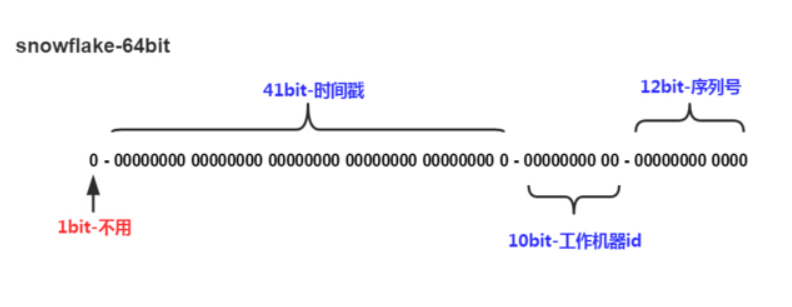
snowflake是Twitter开源的分布式ID生成算法,结果是一个long型的ID。其核心思想是:使用41bit作为毫秒数,10bit作为机器的ID(5个bit是数据中心,5个bit的机器ID),12bit作为毫秒内的流水号(意味着每个节点在每毫秒可以产生 4096 个 ID),最后还有一个符号位,永远是0。

详细改造点

将标志workerId和dataCenterId的10位分别改造为,获取本机mac地址以及获取本机运行进程编号

以往workerId和dataCenterId需要手动输入,如果跨机器输入了同样的代码,可能会导致出现不同机器生成相同代码的可能性

原版算法代码

1
2
3
4
5
6
7
8
9
10
11
12
13
14
15
16
17
18
19
20
21
22
23
24
25
26
27
28
29
30
31
32
33
34
35
36
37
38
39
40
41
42
43
44
45
46
47
48
49
50
51
52
53
54
55
56
57
58
59
60
61
62
63
64
65
66
67
68
69
70
71
72
73
74
75
76
77
78
79
80
81
82
83
84
85
86
87
88
89
90
91
92
93
94
95
96
97
98
99
100
101
102
103
104
105
106
107
108
109
110
111
112
113
114
115
116
117
118
119
120
121
122
123
124
125
126
127
128
129
130
131
132
133
134
135
136
137
138
139
140
141
142
143
144
/**
* Twitter_Snowflake<br>
* SnowFlake的结构如下(每部分用-分开):<br>
* 0 - 0000000000 0000000000 0000000000 0000000000 0 - 00000 - 00000 - 000000000000 <br>
* 1位标识,由于long基本类型在Java中是带符号的,最高位是符号位,正数是0,负数是1,所以id一般是正数,最高位是0<br>
* 41位时间截(毫秒级),注意,41位时间截不是存储当前时间的时间截,而是存储时间截的差值(当前时间截 - 开始时间截)
* 得到的值),这里的的开始时间截,一般是我们的id生成器开始使用的时间,由我们程序来指定的(如下下面程序IdWorker类的startTime属性)。41位的时间截,可以使用69年,年T = (1L << 41) / (1000L * 60 * 60 * 24 * 365) = 69<br>
* 10位的数据机器位,可以部署在1024个节点,包括5位datacenterId和5位workerId<br>
* 12位序列,毫秒内的计数,12位的计数顺序号支持每个节点每毫秒(同一机器,同一时间截)产生4096个ID序号<br>
* 加起来刚好64位,为一个Long型。<br>
* SnowFlake的优点是,整体上按照时间自增排序,并且整个分布式系统内不会产生ID碰撞(由数据中心ID和机器ID作区分),并且效率较高,经测试,SnowFlake每秒能够产生26万ID左右。
*/
public class SnowflakeIdWorker {

// ==============================Fields===========================================
/** 开始时间截 (2015-01-01) */
private final long twepoch = 1420041600000L;

/** 机器id所占的位数 */
private final long workerIdBits = 5L;

/** 数据标识id所占的位数 */
private final long datacenterIdBits = 5L;

/** 支持的最大机器id,结果是31 (这个移位算法可以很快的计算出几位二进制数所能表示的最大十进制数) */
private final long maxWorkerId = -1L ^ (-1L << workerIdBits);

/** 支持的最大数据标识id,结果是31 */
private final long maxDatacenterId = -1L ^ (-1L << datacenterIdBits);

/** 序列在id中占的位数 */
private final long sequenceBits = 12L;

/** 机器ID向左移12位 */
private final long workerIdShift = sequenceBits;

/** 数据标识id向左移17位(12+5) */
private final long datacenterIdShift = sequenceBits + workerIdBits;

/** 时间截向左移22位(5+5+12) */
private final long timestampLeftShift = sequenceBits + workerIdBits + datacenterIdBits;

/** 生成序列的掩码,这里为4095 (0b111111111111=0xfff=4095) */
private final long sequenceMask = -1L ^ (-1L << sequenceBits);

/** 工作机器ID(0~31) */
private long workerId;

/** 数据中心ID(0~31) */
private long datacenterId;

/** 毫秒内序列(0~4095) */
private long sequence = 0L;

/** 上次生成ID的时间截 */
private long lastTimestamp = -1L;

//==============================Constructors=====================================
/**
* 构造函数
* @param workerId 工作ID (0~31)
* @param datacenterId 数据中心ID (0~31)
*/
public SnowflakeIdWorker(long workerId, long datacenterId) {
if (workerId > maxWorkerId || workerId < 0) {
throw new IllegalArgumentException(String.format("worker Id can't be greater than %d or less than 0", maxWorkerId));
}
if (datacenterId > maxDatacenterId || datacenterId < 0) {
throw new IllegalArgumentException(String.format("datacenter Id can't be greater than %d or less than 0", maxDatacenterId));
}
this.workerId = workerId;
this.datacenterId = datacenterId;
}

// ==============================Methods==========================================
/**
* 获得下一个ID (该方法是线程安全的)
* @return SnowflakeId
*/
public synchronized long nextId() {
long timestamp = timeGen();

//如果当前时间小于上一次ID生成的时间戳,说明系统时钟回退过这个时候应当抛出异常
if (timestamp < lastTimestamp) {
throw new RuntimeException(
String.format("Clock moved backwards. Refusing to generate id for %d milliseconds", lastTimestamp - timestamp));
}

//如果是同一时间生成的,则进行毫秒内序列
if (lastTimestamp == timestamp) {
sequence = (sequence + 1) & sequenceMask;
//毫秒内序列溢出
if (sequence == 0) {
//阻塞到下一个毫秒,获得新的时间戳
timestamp = tilNextMillis(lastTimestamp);
}
}
//时间戳改变,毫秒内序列重置
else {
sequence = 0L;
}

//上次生成ID的时间截
lastTimestamp = timestamp;

//移位并通过或运算拼到一起组成64位的ID
return ((timestamp - twepoch) << timestampLeftShift) //
| (datacenterId << datacenterIdShift) //
| (workerId << workerIdShift) //
| sequence;
}

/**
* 阻塞到下一个毫秒,直到获得新的时间戳
* @param lastTimestamp 上次生成ID的时间截
* @return 当前时间戳
*/
protected long tilNextMillis(long lastTimestamp) {
long timestamp = timeGen();
while (timestamp <= lastTimestamp) {
timestamp = timeGen();
}
return timestamp;
}

/**
* 返回以毫秒为单位的当前时间
* @return 当前时间(毫秒)
*/
protected long timeGen() {
return System.currentTimeMillis();
}

//==============================Test=============================================
/** 测试 */
public static void main(String[] args) {
SnowflakeIdWorker idWorker = new SnowflakeIdWorker(0, 0);
for (int i = 0; i < 1000; i++) {
long id = idWorker.nextId();
System.out.println(Long.toBinaryString(id));
System.out.println(id);
}
}
}

改造后代码

1
2
3
4
5
6
7
8
9
10
11
12
13
14
15
16
17
18
19
20
21
22
23
24
25
26
27
28
29
30
31
32
33
34
35
36
37
38
39
40
41
42
43
44
45
46
47
48
49
50
51
52
53
54
55
56
57
58
59
60
61
62
63
64
65
66
67
68
69
70
71
72
73
74
75
76
77
78
79
80
81
82
83
84
85
86
87
88
89
90
91
92
93
94
95
96
97
98
99
100
101
102
103
104
105
106
107
108
109
110
111
112
113
114
115
116
117
118
119
120
121
122
123
124
125
126
127
128
129
130
131
132
133
134
135
136
137
138
139
140
141
142
143
144
145
146
147
148
149
150
151
152
153
154
155
156
157
158
159
160
161
162
163
164
165
166
167
168
169
170
171
172
173
174
175
176
177
178
179
180
181
182
183
184
185
186
187
188
189
190
191
192
193
194
195
196
197
198
199
200
201
202
203
204
205
206
207
208
209
210
211
212
213
214
215
216
217
218
219
220
221
222
223
224
225
226
227
228
229
230
231
232
233
234
235
236
237
238
239
240
241
242
243
244
245
246
247
248
package xxx;

import java.lang.management.ManagementFactory;
import java.net.InetAddress;
import java.net.NetworkInterface;
import java.net.SocketException;
import java.net.UnknownHostException;

/**
* Twitter_Snowflake<br>
* SnowFlake的结构如下(每部分用-分开):<br>
* 0 - 0000000000 0000000000 0000000000 0000000000 0 - 00000 - 00000 - 000000000000 <br>
* 1位标识,由于long基本类型在Java中是带符号的,最高位是符号位,正数是0,负数是1,所以id一般是正数,最高位是0<br>
* 41位时间截(毫秒级),注意,41位时间截不是存储当前时间的时间截,而是存储时间截的差值(当前时间截 - 开始时间截)
* 得到的值),这里的的开始时间截,一般是我们的id生成器开始使用的时间,由我们程序来指定的(如下下面程序IdWorker类的startTime属性)。41位的时间截,可以使用69年,年T
* = (1L << 41) / (1000L * 60 * 60 * 24 * 365) = 69<br>
* 10位的数据机器位,可以部署在1024个节点,包括5位datacenterId和5位workerId<br>
* 12位序列,毫秒内的计数,12位的计数顺序号支持每个节点每毫秒(同一机器,同一时间截)产生4096个ID序号<br>
* 加起来刚好64位,为一个Long型。<br>
* SnowFlake的优点是,整体上按照时间自增排序,并且整个分布式系统内不会产生ID碰撞(由数据中心ID和机器ID作区分),并且效率较高,经测试,SnowFlake每秒能够产生26万ID左右。
*/
public class SnowflakeIdWorker {

// ==============================Fields===========================================
/**
* 开始时间截 (2015-01-01)
*/
private final long startTimestamp = 1420041600000L;

/**
* 机器id所占的位数
*/
private final long workerIdBits = 5L;

/**
* 数据标识id所占的位数
*/
private final long dataCenterIdBits = 5L;

/**
* 支持的最大机器id,结果是31 (这个移位算法可以很快的计算出几位二进制数所能表示的最大十进制数)
*/
private final long maxWorkerId = -1L ^ (-1L << workerIdBits);

/**
* 支持的最大数据标识id,结果是31
*/
private final long maxDataCenterId = -1L ^ (-1L << dataCenterIdBits);

/**
* 序列在id中占的位数
*/
private final long sequenceBits = 12L;

/**
* 机器ID向左移12位
*/
private final long workerIdShift = sequenceBits;

/**
* 数据标识id向左移17位(12+5)
*/
private final long dataCenterIdShift = sequenceBits + workerIdBits;

/**
* 时间截向左移22位(5+5+12)
*/
private final long timestampLeftShift = sequenceBits + workerIdBits + dataCenterIdBits;

/**
* 生成序列的掩码,这里为4095 (0b111111111111=0xfff=4095)
*/
private final long sequenceMask = -1L ^ (-1L << sequenceBits);

/**
* 工作机器ID(0~31)
*/
private long workerId;

/**
* 数据中心ID(0~31)
*/
private long dataCenterId;

/**
* 毫秒内序列(0~4095)
*/
private long sequence = 0L;

/**
* 上次生成ID的时间截
*/
private long lastTimestamp = -1L;

/**
* 一台机器只需要一个实例,以保证产生有序的、不重复的ID
*/
private static final SnowflakeIdWorker SNOWFLAKE_ID_WORKER = new SnowflakeIdWorker();

// ==============================Constructors=====================================

private SnowflakeIdWorker() {
this.dataCenterId = getCurrentDataCenterId();
this.workerId = getCurrentWorkerId(dataCenterId);
}

private SnowflakeIdWorker(long dataCenterId) {
if (dataCenterId > maxDataCenterId || dataCenterId < 0) {
throw new IllegalArgumentException(
String.format("data center Id can't be greater than %d or less than 0", maxDataCenterId));
}
this.dataCenterId = dataCenterId;
this.workerId = getCurrentWorkerId(dataCenterId);
}

/**
* 构造函数
* @param workerId 工作ID (0~31)
* @param dataCenterId 数据中心ID (0~31)
*/
private SnowflakeIdWorker(long workerId, long dataCenterId) {
if (workerId > maxWorkerId || workerId < 0) {
throw new IllegalArgumentException(
String.format("worker Id can't be greater than %d or less than 0", maxWorkerId));
}
if (dataCenterId > maxDataCenterId || dataCenterId < 0) {
throw new IllegalArgumentException(
String.format("data center Id can't be greater than %d or less than 0", maxDataCenterId));
}
this.workerId = workerId;
this.dataCenterId = dataCenterId;
}

public static SnowflakeIdWorker getInstance() {
return SNOWFLAKE_ID_WORKER;
}

// ==============================Methods==========================================

/**
* 获得下一个ID (该方法是线程安全的)
* @return SnowflakeId
*/
public synchronized long nextId() {
long timestamp = timeGen();

// 如果当前时间小于上一次ID生成的时间戳,说明系统时钟回退过这个时候应当抛出异常
if (timestamp < lastTimestamp) {
throw new RuntimeException(String.format(
"Clock moved backwards. Refusing to generate id for %d milliseconds", lastTimestamp - timestamp));
}

// 如果是同一时间生成的,则进行毫秒内序列
if (lastTimestamp == timestamp) {
sequence = (sequence + 1) & sequenceMask;
// 毫秒内序列溢出
if (sequence == 0) {
// 阻塞到下一个毫秒,获得新的时间戳
timestamp = tilNextMillis(lastTimestamp);
}
}
// 时间戳改变,毫秒内序列重置
else {
sequence = 0L;
}

// 上次生成ID的时间截
lastTimestamp = timestamp;

// 移位并通过或运算拼到一起组成64位的ID
return ((timestamp - startTimestamp) << timestampLeftShift)
| (dataCenterId << dataCenterIdShift)
| (workerId << workerIdShift)
| sequence;
}

/**
* 阻塞到下一个毫秒,直到获得新的时间戳
* @param lastTimestamp 上次生成ID的时间截
* @return 当前时间戳
*/
protected long tilNextMillis(long lastTimestamp) {
long timestamp = timeGen();
while (timestamp <= lastTimestamp) {
timestamp = timeGen();
}
return timestamp;
}

/**
* 返回以毫秒为单位的当前时间
* @return 当前时间(毫秒)
*/
protected long timeGen() {
return System.currentTimeMillis();
}

/**
* 获取当前服务器mac地址的ID
* @return
*/
protected long getCurrentDataCenterId() {
long result = 0L;
try {
InetAddress inetAddress = InetAddress.getLocalHost();
NetworkInterface networkInterface = NetworkInterface.getByInetAddress(inetAddress);
if (null != networkInterface) {
byte[] mac = networkInterface.getHardwareAddress();
if (null != mac) {
result = ((0x000000FF & mac[mac.length - 1]) | (0x0000FF00 & (mac[mac.length - 2] << 8))) >> 6;
result %= (maxDataCenterId + 1);
}
} else {
result = 1L;
}
} catch (UnknownHostException | SocketException e) {
throw new RuntimeException(e);
}
return result;
}

/**
* 根据应用进程改造为workId
* @param dataCenterId
* @return
*/
protected long getCurrentWorkerId(long dataCenterId) {
StringBuilder builder = new StringBuilder();
builder.append(dataCenterId);
String processName = ManagementFactory.getRuntimeMXBean().getName();
builder.append(processName.contains("@") ? processName.substring(0, processName.indexOf("@")) : processName);
return (builder.toString().hashCode() & 0xFFFF) % (maxWorkerId + 1);
}

// ==============================Test=============================================

/**
* 测试
*/
public static void main(String[] args) {
for (int i = 0; i < 1000; i++) {
long id = SnowflakeIdWorker.getInstance().nextId();
System.out.println(Long.toBinaryString(id));
System.out.println(id);
}
}
}

阅读全文 »

Presto安装

1、下载

1
wget https://repo1.maven.org/maven2/com/facebook/presto/presto-server/<VERSION>/presto-server-<VERSION>.tar.gz

2、解压

1
tar -zxvf presto-server-<VERSION>.tar.gz -C /usr/local

创建数据目录和解压目录

Presto配置

在安装目录里创建etc目录。etc目录中会有以下配置:

  • 节点属性(Node Properties):每个节点的环境配置
  • JVM配置(JVM Config):Java虚拟机的命令行选项
  • 配置属性(Config Properties):Presto server的配置
  • Catalog属性(Catalog Properties):配置数据源Connector

节点属性(Node Properties)

阅读全文 »

第三方jar发布

打开命令行进入到maven安装目录下的bin目录,敲入如下指令,具体参考根据情况修改,下面有参数详细说明。

1
2
3
4
5
6
7
8
9
mvn deploy:
deploy-file
-DgroupId=hw.vedioicon
-DartifactId=vedioicon
-Dversion=1.0
-Dpackaging=jar
-Dfile=D:\workspace\web-mooc\src\main\webapp\WEB-INF\lib\vedioicon.jar
-Durl=http://host:port/nexus/content/repositories/thirdparty/
-DrepositoryId=thirdparty
  • DgroupId和DartifactId构成了该jar包在pom.xml的坐标,项目就是依靠这两个属性定位。自己起名字也行。
  • Dfile表示需要上传的jar包的绝对路径。
  • Durl私服上仓库的位置,打开nexus——>repositories菜单,可以看到该路径。
  • DrepositoryId服务器的表示id,在nexus的configuration可以看到。
  • 上传成功后,在nexus界面点击3rd party仓库可以看到这包。

项目发布

pom配置:

1
2
3
4
5
6
7
8
9
10
11
<distributionManagement> 
<repository>
<id>releases</id>
<url>http://host:port/nexus/content/repositories/releases/</url>
</repository>
<snapshotRepository>
<id>snapshots</id>
<name>nexus distribution snapshot repository</name>
<url>http://host:port/nexus/content/repositories/snapshots/</url>
</snapshotRepository>
</distributionManagement>

项目右键 run-maven-build 在goal中填写deploy直接运行即可

权限配置:在用户或maven的配置settings.xml,注意如果用户下.m2中配置了settings,以.m2中的为主

1
2
3
4
5
6
7
8
9
10
11
12
13
14
15
16
17
<servers>
<server>
<id>releases</id>
<username>deployment</username>
<password>******</password>
</server>
<server>
<id>snapshots</id>
<username>deployment</username>
<password>******</password>
</server>
<server>
<id>thirdparty</id>
<username>deployment</username>
<password>******</password>
</server>
</servers>
阅读全文 »

环境

Postgresql 9.4.4

列转行

  1. 查询某表数据
1
2
3
4
5
6
7
8
select * from test;

name
------
AA
BB
CC
(3 rows)
  1. 列转行(string_agg)
1
2
3
4
5
6
select string_agg(name,',') from test;

string_agg
------------
AA,BB,CC
(1 row)

行转列

  1. 查询测试表数据
1
2
3
4
5
6
select * from test;

name
-----------
A,B,C,D,E
(1 row)
阅读全文 »